On this page (34)
- What a Shared Inbox for Instagram and Facebook Messages Actually Is
- Why Instagram and Facebook DMs Have Become a Real Support and Sales Channel
- What Goes Wrong When Teams Manage DMs Without a Shared Inbox
- One login and many hands
- Two apps and two queues
- No context at the moment of the reply
- No coverage after hours
- Meta Messaging Rules Every Team Should Understand
- Features to Look for in an Instagram and Facebook Shared Inbox
- Clear ownership and routing
- One history across channels
- AI assistance with a clean human handoff
- Visual automation flows
- Store and customer context
- Translation for multilingual audiences
- Reporting that shows the real picture
- A mobile option for agents
- How KonnectBot Brings Instagram, Facebook and Web Chat Into One Inbox
- A Practical 30 Day Plan to Set Up Your Shared Inbox
- Week 1, audit what you have
- Week 2, connect and structure
- Week 3, automate the repeat questions
- Week 4, measure and refine
- Common Mistakes to Avoid
- Metrics Worth Tracking
- Which Businesses Benefit Most
- Frequently Asked Questions
- Can multiple people reply to Instagram DMs from one business account?
- Do I need an Instagram professional account?
- What is the 24 hour messaging rule?
- Can AI reply to Instagram and Facebook messages?
- How much does a shared inbox for Instagram and Facebook cost?
- How fast should we reply to Instagram and Facebook DMs?
- Turn Every Message Into a Conversation Worth Having
A customer sends your brand a quick question on Instagram at 9:40 on a Friday night. Another asks about a delivery on Facebook Messenger. A third replies to a story with a pricing question. If those messages sit in different apps, owned by whoever happens to be logged in, some of them will go unanswered, and the people behind them will quietly buy somewhere else.
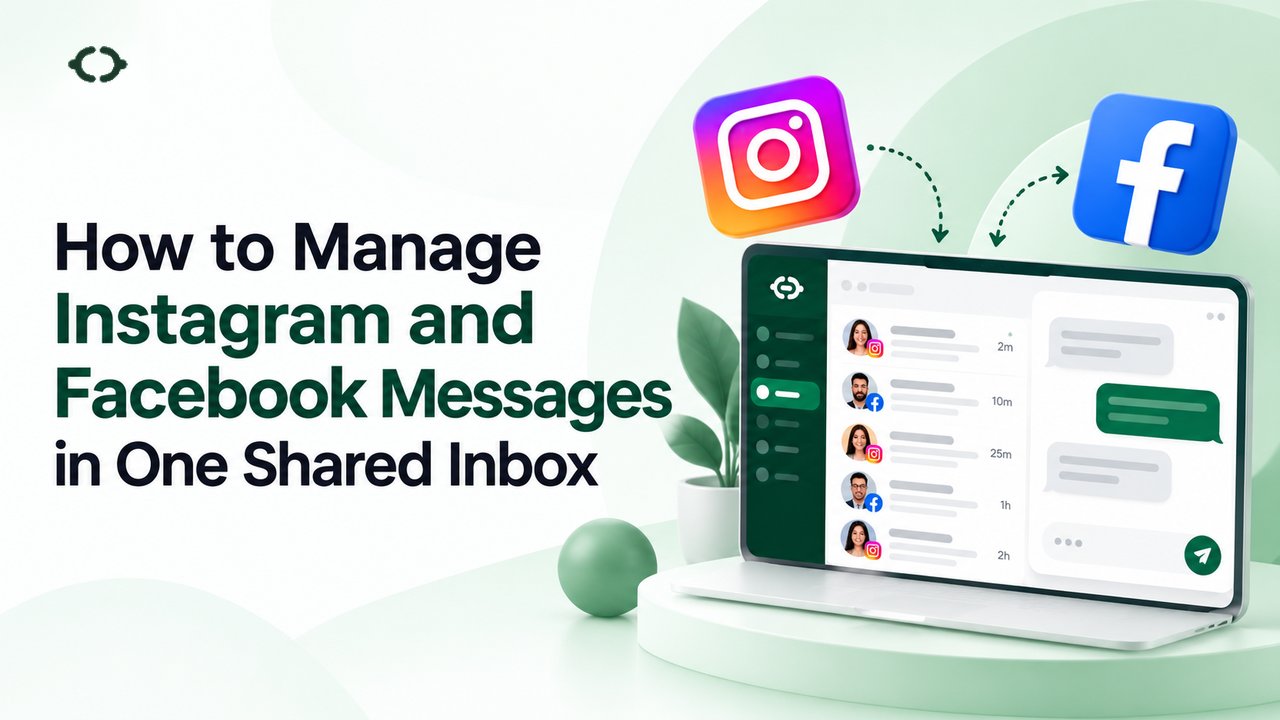
A shared inbox for Instagram and Facebook messages solves this by pulling every direct message into one workspace where your whole team can see, assign, answer and track conversations. Instead of passing around a login or checking two apps all day, your team works from a single queue with clear owners, saved context and faster replies.
This guide explains how a shared social inbox works, what Meta’s messaging rules mean for your team, which features matter most and how to set one up with KonnectBot without turning your first month into a technical project.
What a Shared Inbox for Instagram and Facebook Messages Actually Is
A shared inbox for Instagram and Facebook messages is a customer messaging workspace that connects your business accounts on both platforms and shows every incoming DM in one team queue. Agents can be assigned conversations, read the full history, leave context for colleagues and reply without hunting through separate apps.
A good one goes further than simply displaying messages. It adds routing by team, automation for repeat questions, AI assistance, reporting and links to the systems where your customer and order data live. It also treats social conversations like any other sales or support conversation, so a Messenger question and a website chat can sit side by side.
You will see the same idea described as a social media inbox, an omnichannel inbox, a unified inbox or Instagram DM management software. The labels overlap heavily. The common thread is one place, one team and many channels.
Why Instagram and Facebook DMs Have Become a Real Support and Sales Channel
Direct messages used to be a side channel. For many businesses they are now where first contact happens. A 2025 Emplifi survey of nearly 1,000 US consumers found that frequent social media users most often turn to a brand’s Facebook account (55 percent) and Instagram account (47 percent) when they need customer service.
The same research shows how patient people are not. When it comes to DMs, 32 percent expect a reply within one hour, 23 percent within six hours, 17 percent within 12 hours and another 17 percent within 24 hours. Add those figures together and nearly nine in ten people expect an answer inside a day. The Sprout Social Index 2025 points the same way, reporting that 74 percent of consumers expect a response within 24 hours.
The lesson is not that every message needs a one hour answer. It is that speed and ownership decide whether a DM becomes a sale, a resolved issue or a lost customer. Questions about price, sizing, availability, delivery and booking are buying signals, and they tend to arrive when your team is away from the desk.
What Goes Wrong When Teams Manage DMs Without a Shared Inbox
Most businesses start by handling Instagram and Facebook messages from a phone or from the native apps. That works until volume grows or a second person gets involved. These are the failure points we see most often.
One login and many hands
When several people use the same login, nobody knows who has replied, who is working on a problem or who promised a refund. Duplicate answers and contradictory answers follow. Sharing credentials is also a security risk, because every person who ever held the password keeps access until it is changed.
Two apps and two queues
Facebook Messenger and Instagram DMs often belong to the same customer, yet they live in separate places. Teams end up checking one, forgetting the other and building habits around whichever is louder.
No context at the moment of the reply
A customer asks where their order is. The agent has to leave the chat, open the store dashboard, find the order and come back. That delay is exactly where conversations go cold.
No coverage after hours
Social messages arrive in the evening, on weekends and during holidays. Without automation or a clear handoff process, those messages wait until Monday, and so do the sales attached to them.
Meta Messaging Rules Every Team Should Understand
Instagram and Facebook Messenger both run on Meta’s Messenger Platform, and Meta sets the rules for how businesses may message people. A well built inbox helps you follow them, but your team should still know the basics. The points below come from Meta’s Messenger Platform documentation at the time of writing, and they are worth rechecking from time to time because Meta changes them.
• The person starts the conversation. To message someone on Messenger or Instagram, the conversation has to be initiated by that person.
• The standard messaging window is usually 24 hours. Actions such as sending a message to your account, tapping a button in a conversation, reacting to a message or commenting on a post open the window. Messages sent inside it may include promotional content.
• Ads can extend the window. When someone sends a first message after clicking a Click to Messenger or Click to Direct ad, the window may last up to 7 days from that message.
• The Human Agent tag allows slower manual replies. For conversations that need an escalation path, a real person on your team can respond within 7 days. It is meant for support, not for promotions.
• Tagged messages cannot be promotional. Using a tag outside its approved purpose can restrict your ability to send messages. Meta also began rejecting several older tags on April 27, 2026, including the account update, confirmed event update and post purchase update tags. Utility message templates cover order and appointment updates instead.
• Private replies are limited. A private reply to a comment is a single message and must be sent within seven days of the comment.
• Bots should be disclosed where the law requires it. Meta asks automated chat experiences to tell people they are talking to an automated service where applicable law demands it, and it specifically flags California and Germany. Even where it is not required, Meta recommends transparency.
In practice this means three habits. Reply inside the window whenever you can. Build a human escalation path for anything that takes longer than a day. Keep promotional content out of anything sent outside the standard window. Before choosing any inbox, ask how it handles replies after the 24 hour mark, because that is where weak tools tend to break.
Features to Look for in an Instagram and Facebook Shared Inbox
Vendor feature lists get long fast. These are the capabilities that actually change daily results for a small or mid sized team.
Clear ownership and routing
Every conversation should have an owner, and sensitive or specialist topics should reach the right group automatically. Look for departments such as Sales, Support and Billing, plus the ability to transfer a chat with notes so the next agent does not start from zero.
One history across channels
If the same customer messages you on Instagram on Monday and your website on Wednesday, your agent should see both. Channel context is what turns a reactive inbox into a relationship tool.
AI assistance with a clean human handoff
AI is best at the repetitive part of messaging, such as opening hours, shipping times, plan details and simple order questions. The handoff is what separates a helpful setup from a frustrating one. The customer should never have to repeat themselves when a person joins. Our guide to AI live chat software for sales and support teams goes deeper on how to balance the two.
Visual automation flows
Greetings, qualification questions, routing and follow ups should be buildable without engineering help. A visual flow builder lets a marketer or support lead design those paths and change them when the business changes.
Store and customer context
For online stores, order lookup inside the conversation is a major time saver. When an agent can see order history, tracking and inventory in the same screen as the chat, a five minute task becomes a thirty second one.
Translation for multilingual audiences
Social audiences are rarely monolingual. Built in translation lets agents reply comfortably in languages they do not speak, which is covered in more depth in our post on live message translation.
Reporting that shows the real picture
You need response times, volume by channel, agent workload and the split between AI handled and human handled conversations. Without those numbers, you cannot tell whether the inbox is helping or just moving the pile around.
A mobile option for agents
Messages do not wait for office hours. If your team works in the field or on shifts, check whether agents can handle chats from a phone.
How KonnectBot Brings Instagram, Facebook and Web Chat Into One Inbox
KonnectBot is live chat software for sales and support teams that puts web chat, Facebook Messenger and Instagram DMs into the same inbox, alongside AI assistance, automation and human agents. The idea is simple. Routine questions get quick answers, and when a conversation needs a person, an agent steps in with the full history already in front of them.
Here is what that looks like in practice, based on what KonnectBot publishes today.
• One inbox for every channel. Website chat, Messenger and Instagram sit in a shared team inbox, so nothing depends on who checked which app.
• AI plus human handoff. The AI assistant drafts replies to routine questions and escalates complex ones with context intact, so customers do not repeat themselves.
• Departments and routing. Pro includes 5 departments and Enterprise includes 20, so a pricing question and a billing issue reach different people.
• [Automation flows](https://konnectbot.com/features/automation-flows). Design greetings, qualification, handoffs and follow ups visually, without writing code.
• Store context. On Pro and Enterprise, Shopify and WooCommerce order lookup lets agents see order status, tracking and customer history inside the chat.
• Live translation. Pro and Enterprise include real time translation of incoming and outgoing messages.
• Analytics and an Android agent app. Track response times, satisfaction and team performance, and let agents reply on the go. An iOS app is not currently published.
Pricing is straightforward. Facebook and Instagram messaging is available on every plan, including the Free plan, which supports one agent. Starter is $24.99 per month with 3 agents, 15,000 AI messages and automation flows. Pro is $59 per month with 5 agents, 50,000 AI messages, in-chat payments, store integrations, live translation and 5 departments. Enterprise is $199 per month with 20 agents, 100,000 AI messages and 20 departments. There is a 14 day free trial with no credit card required. You can see the latest details on the pricing section of the site, and a full overview on the features page.
A Practical 30 Day Plan to Set Up Your Shared Inbox
You do not need a big project to get value from a shared social inbox. This four week plan keeps the work small and the results measurable.
Week 1, audit what you have
Count how many DMs arrive on Instagram and Facebook in a typical week, note the busiest hours and write down the ten questions you answer most often. Check that your Instagram account is a professional account, because Meta’s business messaging tools are built around professional accounts. Decide who will own the inbox day to day.
Week 2, connect and structure
Create your workspace, connect your channels and add your agents. Set up departments that mirror how your business actually works, such as Sales, Support and Billing. Write short, human sounding replies for your top ten questions so agents and the AI have consistent material to work from.
Week 3, automate the repeat questions
Build your first automation flow around the highest volume question, often order status, pricing or opening hours. Add a clear option to reach a person at every step. If you use AI replies, make sure the experience is labeled as automated where the law requires it. Test the flow yourself from a personal Instagram account before customers see it.
Week 4, measure and refine
Review first response time, resolution time, the share of conversations handled by AI and the share handed to humans. Read a sample of conversations. Fix the places where customers asked for a person or repeated themselves, then expand what works.
Common Mistakes to Avoid
• Automating everything on day one. Start with the repetitive questions and keep a person easy to reach.
• Ignoring the messaging window. A reply that arrives after the window closes may not be deliverable under standard messaging, so build coverage for evenings and weekends.
• Using tags for promotions. Message tags are for allowed, non-promotional purposes. Misuse can lead to restrictions.
• Hiding that a bot is a bot. Transparency builds trust and, in some places, is a legal requirement.
• Collecting sensitive details in a DM. Keep payment card numbers, passwords and private health information out of social conversations, and send customers to a secure checkout or portal instead.
• Measuring only speed. A fast, unhelpful reply is not a win. Track resolution and satisfaction alongside response time.
Metrics Worth Tracking
Four numbers tell you most of what you need. First response time shows how quickly customers hear from you. Resolution time shows how long problems stay open. The AI handled share shows how much routine work automation absorbs. Conversion from conversation to sale shows whether the inbox earns its keep. Review them weekly at first, then monthly once the process settles.
Which Businesses Benefit Most
Any business that gets questions on social media can benefit, but the gains are largest where messages are frequent and time sensitive. Online stores handle order questions and product questions all day, which is why the e-commerce and DTC setup is a natural fit. Real estate teams, automotive dealerships, travel brands, schools and clinics also receive a steady stream of enquiries that turn into appointments, bookings and enrollments. Healthcare teams in particular should keep clinical details out of social DMs and use them to move people to a secure channel.
Frequently Asked Questions
Can multiple people reply to Instagram DMs from one business account?
Yes. A shared inbox connects your business account through Meta’s supported messaging tools, so several agents can work from one workspace. Your team signs in to the shared inbox instead of passing around the Instagram password, which also makes it easier to see who replied to what.
Do I need an Instagram professional account?
Meta’s business messaging tools work with Instagram professional accounts, so you should switch a personal profile to a professional account before connecting it. Depending on how your account is set up, you may also need a linked Facebook Page.
What is the 24 hour messaging rule?
It is Meta’s standard messaging window. After a person messages your business, comments or takes another qualifying action, you can send them messages for 24 hours, including promotional ones. Conversations that start from a Click to Messenger or Click to Direct ad may get up to 7 days. After the window, manual support replies can use the Human Agent tag for up to 7 days, but it is not meant for promotions.
Can AI reply to Instagram and Facebook messages?
Meta allows automated chat experiences as long as you follow its policies, including disclosing that a person is talking to an automated service where the law requires it. In KonnectBot, the AI assistant drafts replies to routine questions and hands off to your team with full context when a person is needed.
How much does a shared inbox for Instagram and Facebook cost?
Prices vary by vendor. KonnectBot offers Facebook and Instagram messaging on every plan, starting with a Free plan for one agent, then Starter at $24.99 per month, Pro at $59 per month and Enterprise at $199 per month. You can also compare KonnectBot with other tools before you decide.
How fast should we reply to Instagram and Facebook DMs?
Aim for a first response within one hour during business hours, since about a third of consumers expect that speed for DMs. Outside business hours, use automation to acknowledge the message and set expectations, then follow up with a person well inside the 24 hour window.
Turn Every Message Into a Conversation Worth Having
Instagram and Facebook are not just places to post. They are places where customers ask questions, compare options and decide whether to buy. A shared inbox gives your team the structure to answer quickly, keep context and follow Meta’s rules, while AI handles the repeat questions that would otherwise eat the day.
If your team is still juggling logins and apps, the fastest way to see the difference is to try it. Start a free 14 day trial of KonnectBot with no credit card, or book a 15 minute demo and see how Instagram, Facebook and web chat can run from one inbox.