On this page (18)
- What Is a Visual Automation Flow Builder?
- Why "No-Code" Matters for Sales and Support Teams
- Core Building Blocks of a Good Flow Builder
- 1. Trigger blocks
- 2. Message blocks
- 3. Condition blocks
- 4. Action blocks
- 5. Handoff blocks
- Real Examples of Flows You Can Build
- Abandoned Cart Recovery Flow
- New Visitor Qualification Flow
- Order Status Flow
- Multilingual Support Flow
- Common Mistakes Businesses Make With Automation Flows
- How This Fits Into a Full AI Live Chat Strategy
- Getting Started With Your First Flow
- Frequently Asked Questions About Visual Flow Builders
- Final Thoughts
If you've ever tried to set up a chatbot using a spreadsheet of "if this, then that" rules or a developer's custom script, you already know the problem: the moment you want to change one small thing a greeting, a discount offer, an escalation path you're stuck waiting on a developer or digging through confusing settings menus.
A visual automation flow builder solves this by turning conversation logic into something you can literally see and drag around on a canvas. This post explains what a flow builder is, why it matters for sales and support automation, and how KonnectBot visual builder lets non-technical teams design powerful chat automations in minutes.
What Is a Visual Automation Flow Builder?
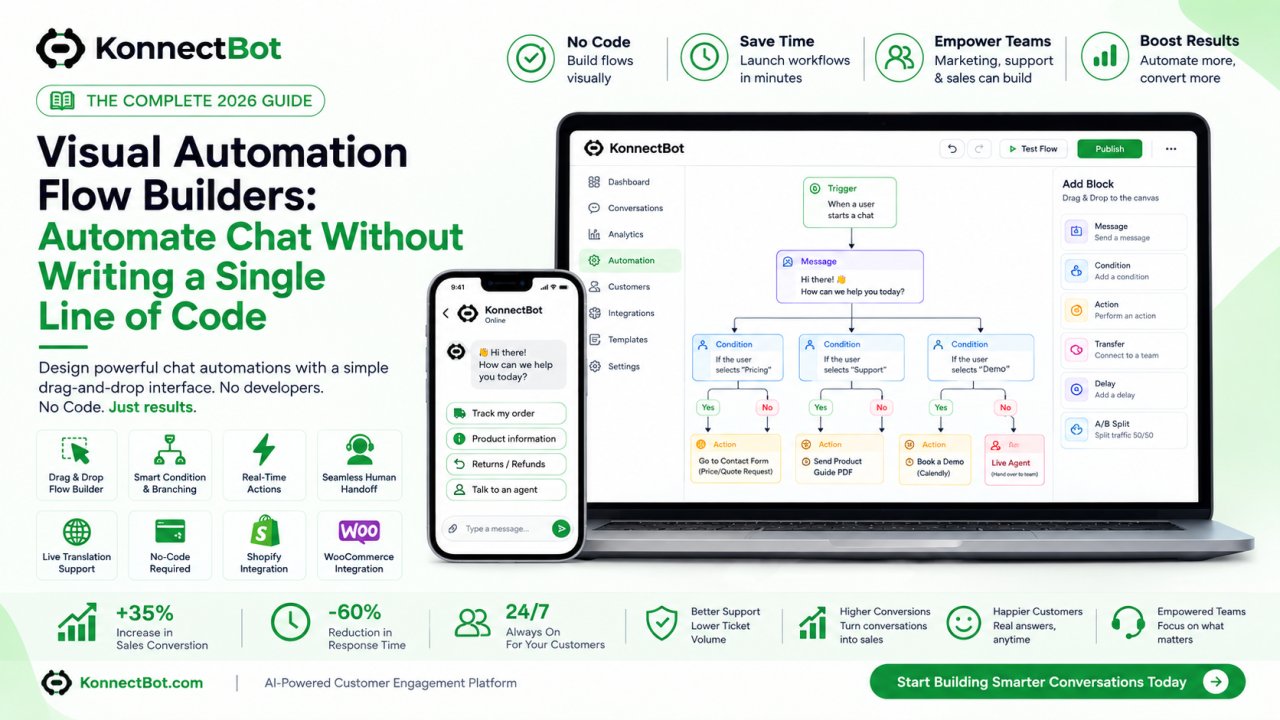
A visual automation flow builder is a drag-and-drop interface where you design the logic of a conversation as a flowchart instead of writing code. Each step in the conversation a greeting message, a question, a conditional branch, an action like "check order status" becomes a block you can connect to other blocks.
Instead of a support agent or developer having to imagine every possible customer path in their head, the flow builder makes the entire conversation visible at once. You can see exactly what happens if a customer says "yes" versus "no," what happens if they ask about a refund, and where the conversation eventually leads whether that's a resolved answer, a completed purchase, or a handoff to a human agent.
Why "No-Code" Matters for Sales and Support Teams
Most sales and support teams don't have a developer on standby to update chatbot logic every time a policy changes or a new promotion launches. A no-code visual flow builder removes that bottleneck entirely.
Consider a common scenario: your business just launched a holiday sale, and you want your live chat to proactively mention the discount code to anyone browsing the sale category. With a traditional coded chatbot, that's a ticket to your dev team. With a visual flow builder like the one built into KonnectBot, it's a five-minute edit drag in a new message block, set the condition ("visitor is on a sale page"), connect it to the existing flow, and publish.
This matters because the teams closest to the customer support leads, marketing managers, ecommerce operators are usually the ones who understand what needs to change. A flow builder puts that power directly in their hands.
Core Building Blocks of a Good Flow Builder
When evaluating (or using) a visual flow builder, these are the components that actually make a difference:
1. Trigger blocks
These define what starts a conversation flow a new visitor landing on a page, a specific keyword typed into chat, cart abandonment, or a customer clicking a chat bubble.
2. Message blocks
Simple text, images, buttons, or quick-reply options the AI sends to the visitor.
3. Condition blocks
This is where the "smart" part of automation lives. A condition block checks something has this customer ordered before? Are they asking about shipping? Is their message in a language other than English? and routes the conversation down a different path based on the answer.
4. Action blocks
These connect the conversation to real systems: checking order status in Shopify or WooCommerce, applying a discount code, collecting an email address, or triggering an in-chat payment.
5. Handoff blocks
The safety net of any good automation a rule that says "if the AI isn't confident, or the customer explicitly asks for a human, route this conversation to a live agent."
KonnectBot visual flow builder includes all five block types, letting you design everything from a simple FAQ responder to a full multi-step sales qualification flow, entirely visually.
Real Examples of Flows You Can Build
Abandoned Cart Recovery Flow
Trigger: visitor adds an item to cart but doesn't check out within 10 minutes.
Message: "Still thinking it over? Here's 10% off if you complete your order in the next hour."
Action: apply discount code automatically if the customer replies "yes."
Result: recovered sale, without a human ever getting involved.
New Visitor Qualification Flow
Trigger: first-time visitor opens the chat widget.
Message: "Hi! Are you shopping for yourself or looking for a gift?"
Condition: branch the conversation based on the answer, recommending different product categories.
Action: collect the visitor's email in exchange for a discount code.
Order Status Flow
Trigger: customer types "where is my order" or similar phrasing.
Action: pull the order status directly from Shopify or WooCommerce.
Message: respond with the real-time shipping status, no human agent required.
Handoff: if the order shows a delay or an error, automatically route to a support agent with the order details attached.
Multilingual Support Flow
Trigger: customer messages in a language other than the agent's default.
Action: apply live message translation so the agent can read and reply in their own language, while the customer sees everything in theirs.
Result: your existing team can support international customers without hiring multilingual staff.
Common Mistakes Businesses Make With Automation Flows
Trying to automate everything at once. Start with your 3-5 highest-volume conversation types. Expand gradually as you see what's working.
No handoff path. Every flow needs a clear exit to a human agent. Customers get frustrated fast when a bot loops them in circles with no way out.
Ignoring flow analytics. A good flow builder shows you where customers drop off or get stuck. Reviewing this weekly is how you actually improve conversion and satisfaction over time.
Overly robotic messaging. Even automated flows should sound like your brand's voice, not a generic script. Small wording changes make automated conversations feel more human.
How This Fits Into a Full AI Live Chat Strategy
A visual flow builder isn't a standalone tool it's the backbone that connects your AI live chat, translation, payments, and ecommerce data into one coherent experience. On KonnectBot, the flow builder is the layer where you decide:
-
When the AI responds automatically versus when it hands off to a human
-
When to trigger in-chat payments during a sales conversation
-
When to apply live translation for an international customer
-
How to pull real order and product data from Shopify or WooCommerce into the conversation
Because it's visual, your whole team not just developers can see exactly how customer conversations are structured, and adjust them as your business evolves.
Getting Started With Your First Flow
-
Pick one high-volume use case (order status, shipping FAQ, or abandoned cart recovery are great starting points).
-
Map out the conversation on paper first: what does the customer typically ask, and what are the 2-3 most common follow-up questions?
-
Build it in the visual flow builder using message, condition, and action blocks.
-
Add a clear handoff rule for anything outside the flow's scope.
-
Test it yourself by chatting with your own bot before publishing live.
-
Review transcripts after a week and refine based on real customer behavior.
Frequently Asked Questions About Visual Flow Builders
Do I need any technical skills to use a visual flow builder?
No. That's the entire point of a no-code, drag-and-drop interface if you can map out a conversation on a whiteboard, you can build it in a flow builder like KonnectBot.
Can a flow builder connect to my existing store data?
Yes, when it's built with ecommerce in mind. KonnectBot flow builder connects directly to Shopify and WooCommerce, so action blocks can check real order status, apply real discount codes, or reference real inventory.
How many flows should I build to start?
Start small. Most businesses see the fastest results by automating their top three to five recurring questions first usually order status, shipping policy, and returns then expanding once those flows are proven.
What happens if the AI can't answer something inside a flow?
A well-designed flow always includes a handoff block that routes the conversation to a human agent, along with relevant context, so the customer never gets stuck in an automated loop.
Can I edit a flow after it's live?
Yes that's one of the main advantages of a visual builder. You can update messages, add new conditions, or adjust escalation rules at any time without waiting on a developer.
Final Thoughts
A visual automation flow builder turns chat automation from a developer-dependent project into something your whole team can own and improve continuously. Instead of guessing what customers need, you can see the entire conversation, test it, and refine it all without writing a single line of code.
If you want to see this in action, KonnectBot visual flow builder is built directly into its AI live chat platform, alongside translation, in-chat payments, and native Shopify and WooCommerce integrations so your automation, sales, and support all live in one place.